Is your Whirlpool refrigerator’s water filter light still on after changing the filter? You’re not alone.
Many people struggle with resetting the water filter indicator, which can be confusing and frustrating. But don’t worry—resetting your Whirlpool water filter is easier than you think. You’ll discover simple, step-by-step instructions to get your filter reset quickly. Keep reading to make sure your fridge keeps providing clean, fresh water without any hassle.
Credit: www.searspartsdirect.com
Locate The Water Filter
Locating the water filter in your Whirlpool refrigerator is the first essential step before resetting it. Knowing exactly where the filter sits helps you access it quickly and understand its type, which is crucial for a proper reset. Let’s explore how to find and identify your water filter so you can keep your fridge running smoothly.
Find Filter Inside The Fridge
Most Whirlpool refrigerators house the water filter inside the fridge compartment, typically near the upper right or lower left corner. Open your fridge door and look along the walls or ceiling for a small, cylindrical cartridge or a rectangular housing.
If you don’t spot it immediately, check near the crisper drawers or behind a small panel. Sometimes, the filter is hidden behind a twist-off cap or a sliding cover that blends with the interior. Have you noticed how easy it is to overlook this small part until you know exactly where to look?
Identify Filter Type
Once you find the filter, it’s important to identify its type before resetting. Whirlpool refrigerators often use either a push-button filter or a twist-in style. Look for model numbers or labels on the filter itself; this info helps you find the correct reset instructions and replacement filters.
Knowing your filter type can save time and prevent damage. For instance, a push-button filter usually resets automatically after replacement, while a twist-in filter might need a manual reset using the control panel. Have you checked your filter’s label recently? It might hold the key to an easy reset.
Remove And Replace The Filter
Removing and replacing the water filter on your Whirlpool refrigerator is a straightforward task that keeps your water tasting fresh and your appliance running smoothly. Taking the right steps ensures you avoid leaks or damage. Let’s break down the process into clear, manageable actions.
Turn Off Water Supply
Before you touch the filter, make sure to turn off the water supply to your refrigerator. This simple action prevents any unexpected spills or drips. You can usually find the shut-off valve behind the fridge or under the sink nearby.
Have you ever started replacing a filter only to be greeted by a sudden splash? Turning off the water supply first saves you from that mess.
Twist Out Old Filter
Locate the old filter inside the fridge, often in the upper right corner or behind a cover panel. Hold it firmly and twist it counterclockwise. The filter should come out smoothly without forcing it.
If the filter feels stuck, check the manual or try gently wiggling it while turning. Avoid using excessive force to prevent damage.
Insert New Filter
Take your new filter and align it with the filter housing. Push it in and twist clockwise until it locks securely in place. You should feel it click or stop turning, indicating it’s properly seated.
Once installed, turn the water supply back on. Run a few cups of water through the dispenser to clear out any air or loose carbon particles. This step ensures your water tastes clean and fresh right away.
Reset The Filter Indicator
Resetting the filter indicator on your Whirlpool refrigerator is essential after changing the water filter. It helps the fridge track the new filter’s usage and alerts you when it’s time for another replacement. This process is simple and ensures your water stays clean and fresh.
Use Control Panel Buttons
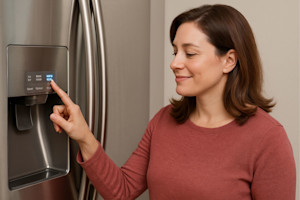
Locate the control panel on your Whirlpool refrigerator. Find the button labeled “Filter Reset” or “Water Filter.” Press and hold this button for about 3 seconds. The indicator light will start blinking or turn off. This action resets the filter status in the system. Some models may require pressing the “Ice” or “Light” button along with the filter reset button. Refer to your model’s manual if unsure.
Confirm Reset Success
After resetting, check the filter indicator light. It should turn off or change color, showing a successful reset. The control panel may display a message like “Filter Reset” or “Good.” If the light stays on, repeat the reset process. Confirm that the new filter is installed properly. A reset confirms your refrigerator tracks the new filter’s life correctly.

Credit: www.reddit.com
Credit: glacierfreshfilter.com
Frequently Asked Questions
How Do I Know When To Reset My Whirlpool Water Filter?
The filter indicator light turns on, signaling it’s time to reset after replacement.
What Is The Easiest Way To Reset The Water Filter Light?
Press and hold the reset button for 3 seconds until the light turns off.
Can I Reset The Water Filter Without Changing The Filter?
Resetting without changing may give false results and affect water quality.
How Often Should I Replace And Reset The Whirlpool Water Filter?
Replace and reset every six months or when the filter indicator alerts.
What Happens If I Don’t Reset The Water Filter Light?
The light stays on, and it may affect water taste and filter performance.
Conclusion
Resetting the water filter on your Whirlpool fridge keeps water fresh and clean. Follow the steps carefully to avoid mistakes. Regular resets help the filter work well longer. It also prevents bad tastes or odors in your water. Remember to reset after changing the filter for best results.
This simple task saves you time and trouble later. Keep your fridge running smoothly with easy filter resets. You can do it quickly without special tools. Stay hydrated with fresh water anytime you want.